


USMLE Blog
How to Register for USMLE Step 1 (2026)
Complete Guide for IMGs, U.S. & Canadian Medical Students


I hope you enjoy reading this blog post.
If you want our team’s expert help with your USMLE prep, click here
Updated April 2026
Registering for USMLE Step 1 can feel overwhelming, especially after the major registration changes introduced in 2026. Between new portals, eligibility requirements, identity verification, and scheduling timelines, it’s easy to worry about missing a step or choosing the wrong pathway.
The good news is that the process becomes manageable when broken into clear, sequential steps.
In this guide, we walk you through the updated registration process for both International Medical Graduates (IMGs) and U.S./Canadian medical students using current information from USMLE, FSMB, NBME, and ECFMG/Intealth sources. Whether you’re registering for the first time or transitioning from older systems, this article will help you move through the process confidently, avoid common delays, and plan your exam timeline with less stress.
For a full USMLE Step 1 study guide covering schedules, resources, and high-yield strategies, check out our detailed guide here.
Study for Step 1 with total confidence knowing your prep is fully supported from day one. Get 40 free questions and our Step 1 pass guarantee
Table of Contents
Overview: Which Pathway Applies to You?
IMGs (International Medical Graduates): Students and graduates of medical schools outside the U.S. that are listed in the World Directory of Medical Schools as meeting ECFMG eligibility requirements. You register via FSMB after completing ECFMG prerequisites through MyIntealth.
U.S. / Canadian Students: Students and graduates of LCME- or COCA-accredited programs in the United States or Canada. You register entirely through NBME via the MyUSMLE Portal.
⚠️ The January 2026 USMLE Service Transition consolidated all registration services. IMGs now use FSMB (previously ECFMG handled registration). U.S. students now use NBME. If you started a registration before January 12, 2026, your records were transferred to the appropriate portal.
Choose Your Registration Pathway
- Jump to IMG Registration
- Jump to U.S./Canadian Student Registration
What You’ll Need Before You Start
Before beginning registration, gather the following:
- Current passport or government-issued ID
- Medical school information and enrollment dates
- Graduation status (student or graduate)
- Preferred testing timeline
- Payment method for registration fees
- Stable internet connection for verification steps
Preparing these items in advance can make registration smoother and reduce unnecessary delays.
PART 1: USMLE Step 1 Registration for International Medical Graduates (IMGs)
The IMG pathway involves six sequential steps across two platforms, with each step unlocking the next. You cannot skip or reorder them.
Step 1: Create Your MyIntealth Account
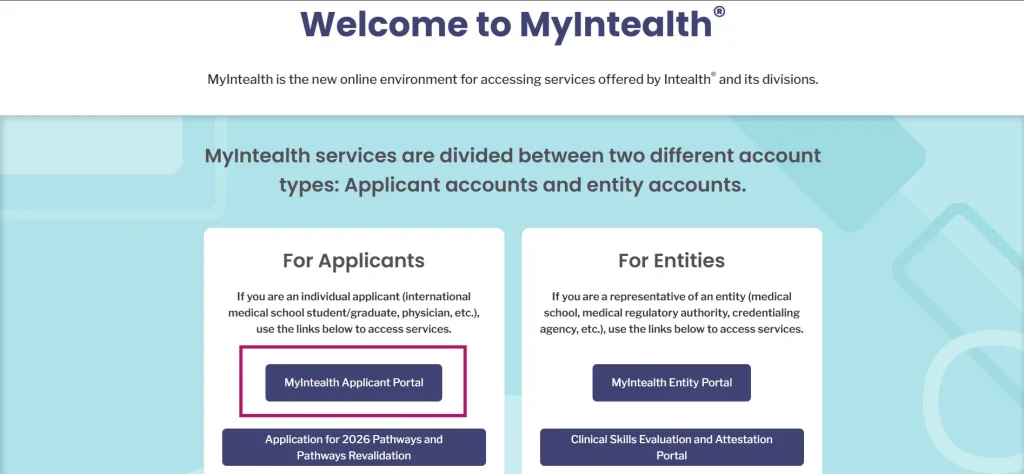
Before anything else, you need to establish your identity with ECFMG through the MyIntealth Applicant Portal (applicant.myintealth.app). This platform is run by Intealth (ECFMG’s parent organization) and is used exclusively for ECFMG Certification.
Source: ECFMG
Phase 1: Email Verification
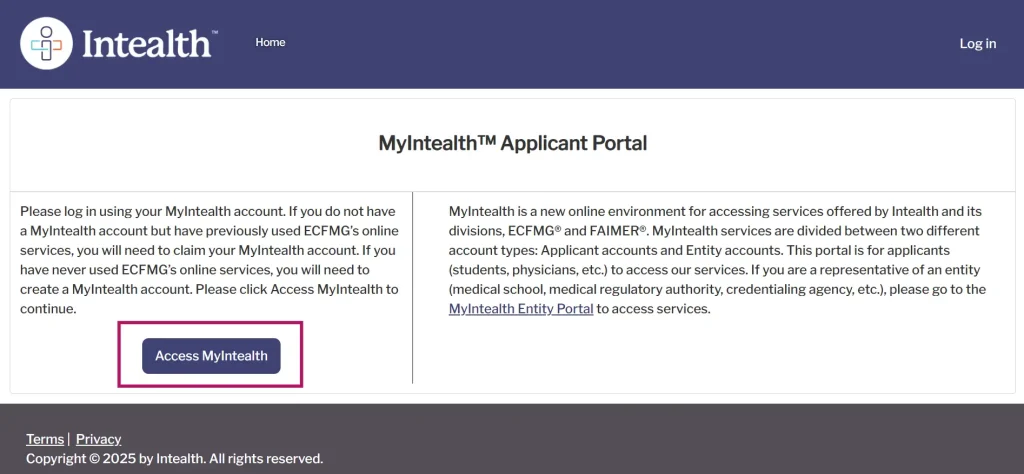
1. Go to the MyIntealth Applicant Portal and click ‘Access MyIntealth.’
Source: ECFMG
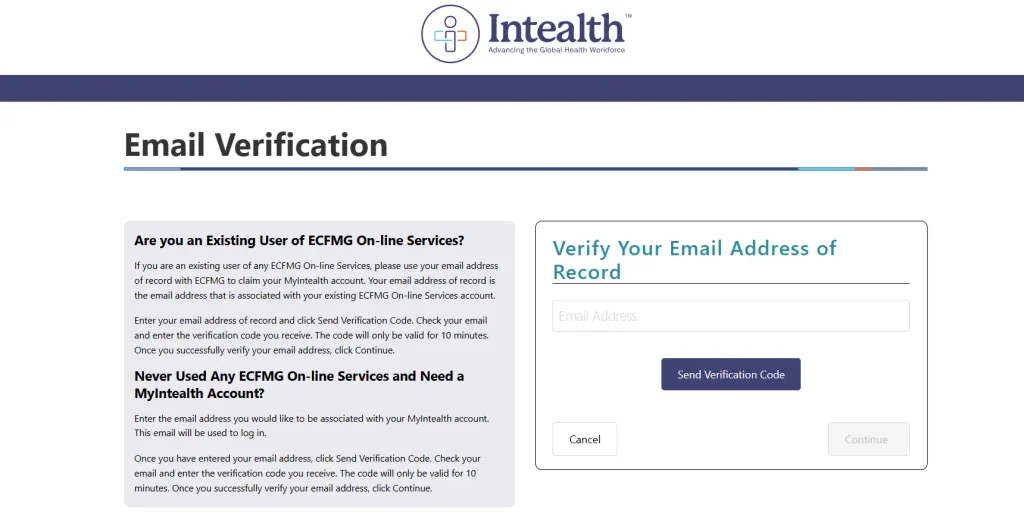
2. Click ‘Don’t have a MyIntealth account?’ and enter your email address.
3. If you previously used ECFMG’s old systems (IWA, OASIS), use the same email so your history carries over.
4. A 6-digit verification code will be sent to your email. Enter it to confirm your address.
Source: ECFMG
Phase 2: Name and Password Setup
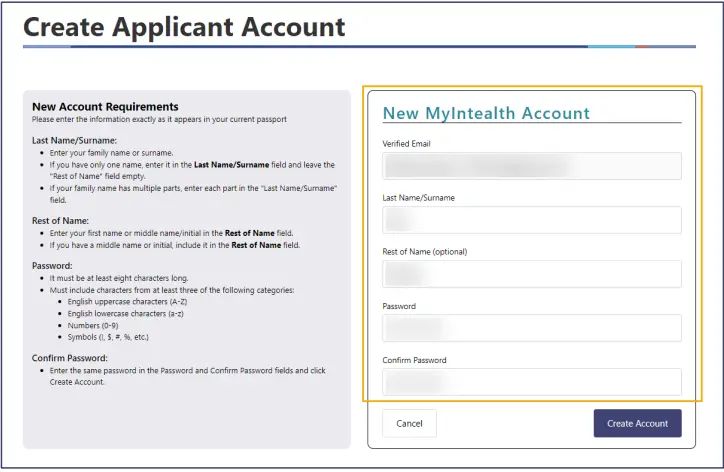
5. Enter your Last Name and the Rest of Your Name exactly as they appear on your current, valid passport. A single character mismatch can delay or block your account.
6. Create a password with at least 8 characters, using three of the following: uppercase letters, lowercase letters, numbers, symbols.
Source: ECFMG
✅ Get Full Access to All High-Yield NOTES – For FREE!
To access all the PDFs of the Step 1 High-Yield topics, sign up below and we’ll send them to your inbox — completely free.
Phase 3: Account Establishment Application
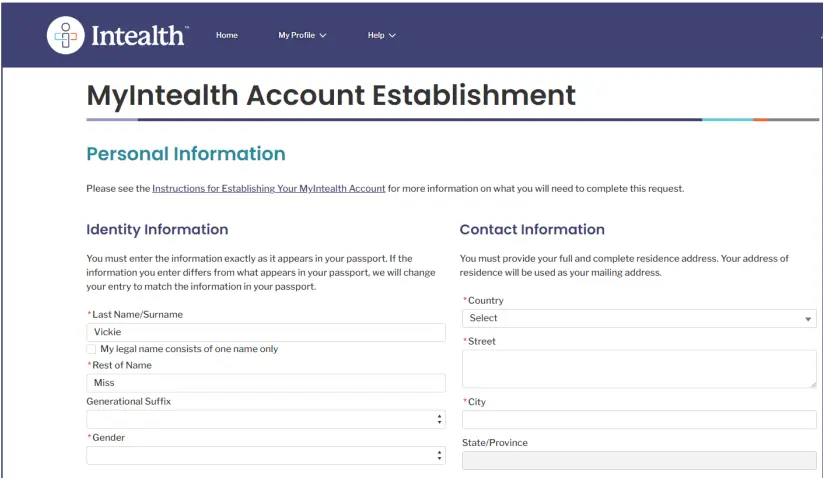
7. Once logged in, click ‘Begin Application’ under the ECFMG Certification tab.
8. Complete the following sections:
◦ Identity Information: Confirm name, date of birth, gender.
◦ Contact Information: Full residential address required. P.O. Boxes and hospital addresses are not accepted.
◦ School Information: Search for your medical school. If it does not appear, click ‘Submit New School’ and enter your university details, including start/end dates and student ID.
◦ Medical Registration (optional): If you are already licensed to practice medicine in another country, you may enter that here.
Source: ECFMG
Phase 4: Attestations and Account Fee
9. Review and accept the required legal agreements (Release of Legal Claims, Release of Information Authorization, Account Establishment Attestation).
10. Pay the $110 Account Establishment Fee via credit/debit card or bank account.
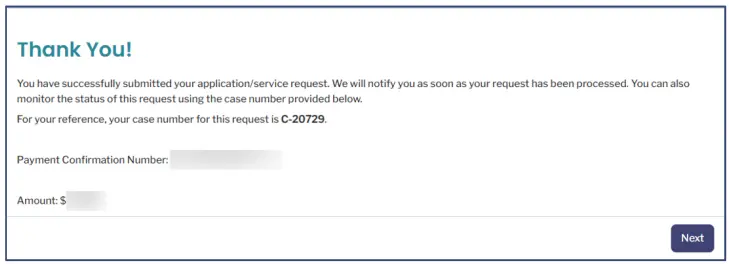
11. Save the Case Number shown on the confirmation screen (format: C-12345). You will need it for any future support inquiries.
Source: ECFMG
Cost: $110 (Account Establishment Fee)
Processing Time: Typically 1–2 business days after payment.
You don’t need 4,000 questions to pass Step 1. You need the high-yield questions with the right support.
✅ 1,350 high-yield Step 1 questions
✅ Daily live tutor
✅ 24/7 AI chat tutor
✅ Integrated HY flashcards
✅ Backed by our PASS Guarantee.
Synapse gives you a smarter way to pass.
Step 2: Identity Verification via NotaryCam
Once your account is active, ECFMG requires you to verify your identity via a short live video call with a U.S.-licensed notary through NotaryCam. This is how ECFMG confirms the person creating the account is who they say they are.
What You Need Before Starting
- Your original physical passport (must be current and valid)
- Google Chrome browser
- A device with a working webcam and microphone
- A stable internet connection
The Process
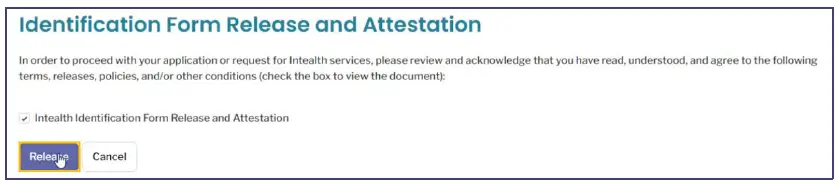
12. From your MyIntealth dashboard, locate and view your Intealth Identification Form (IIF). Confirm that your name, date of birth, and gender match your passport exactly.
13. Check the attestation box, click ‘Accept,’ then click ‘Release’ to electronically transmit the IIF to NotaryCam.
Source: ECFMG
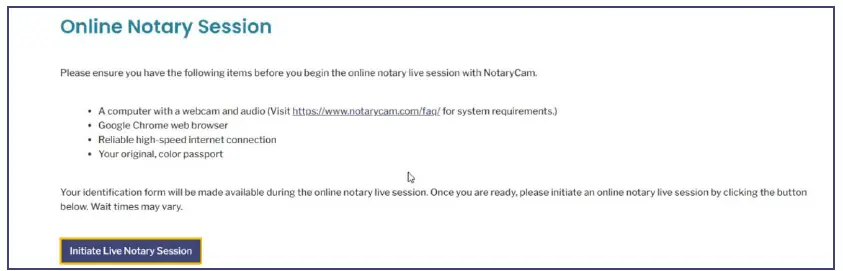
14. Your dashboard status will update to ‘Online Notary Session Created.’ Click ‘Initiate Live Notary Session.’

Source: ECFMG
Source: ECFMG
15. You will be routed to the NotaryCam portal. Accept terms, allow browser permissions for camera and microphone, and run the tech check.
16. In the live video session, the notary will review your IIF and inspect your physical passport on camera.
17. When prompted, provide your digital signature using the NotaryCam tool (text, drawn, or uploaded).
18. The notary will complete their section and affix their official seal. The finalized document is automatically transmitted back to Intealth.
Cost: Included with the Account Establishment Fee (no additional charge).
Time to Get an Appointment: Usually 1–3 days.
Processing After the Call: Intealth typically reviews the completed form within 1 business day.
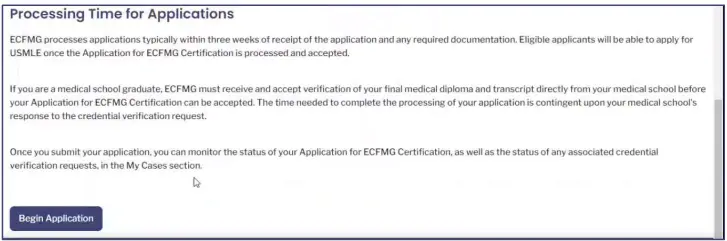
Step 3: Submit Your Application for ECFMG Certification
After your identity is verified, you must formally apply for ECFMG Certification. This confirms your intent to pursue U.S. licensure and collects your medical education history. You cannot register for the USMLE through FSMB until this application is submitted and accepted.
How to Submit
19. Log into MyIntealth, go to ‘Services,’ and select ‘ECFMG Certification.’

Source: ECFMG
20. Click ‘Begin Application’ at the bottom of the overview page.
Source: ECFMG
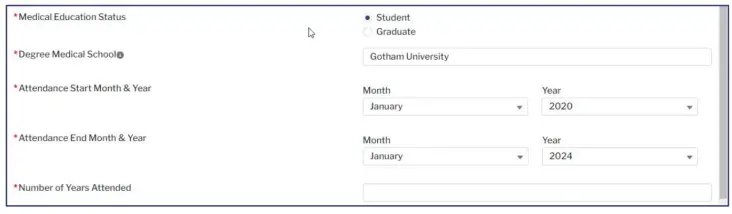
21. Review and confirm your Identity Information and Medical School details.
Source: ECFMG
22. If you attended multiple medical schools or have transfer credits, document this in the ‘Other Medical Schools Attended’ section and upload your transcript.
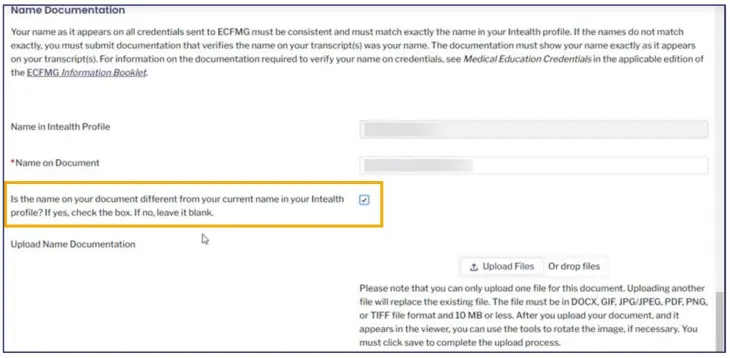
23. If the name on your transcript differs from your Intealth profile (e.g., due to a name change or translation), upload supporting legal documentation.
Source: ECFMG
24. If your transcript is not in English, upload a certified English translation.
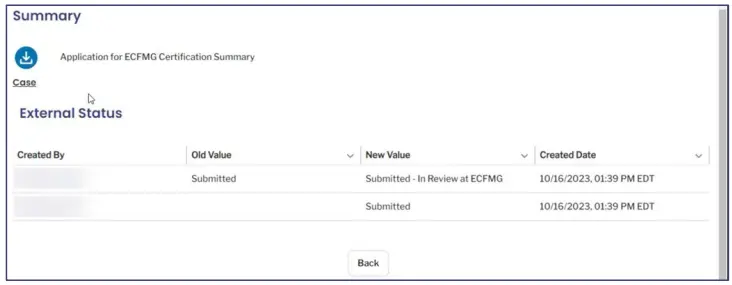
25. Review the application summary, accept the attestations, and pay the application fee.

Source: ECFMG
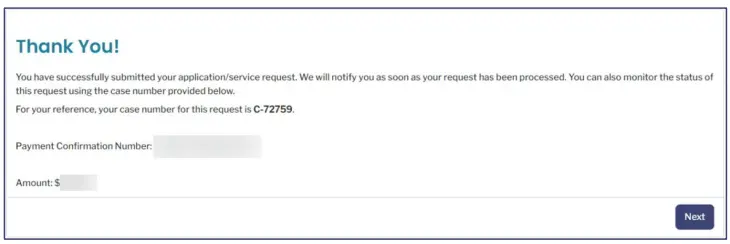
26. Save the case number from the confirmation screen.
Source: ECFMG
Documents Required by Graduation Status
If you are a Current Student: ECFMG will verify your enrollment status directly with your medical school, typically through the electronic EMSWP portal. You do not need to upload a diploma.

Source: ECFMG
If you are a Graduate: You must upload a scanned copy of your Final Medical Diploma and Final Medical Transcript. A $220 Credential Verification Fee ($110 per document) will be charged when you upload these for primary-source verification.
Cost: $580 (Certification application) + $220 if graduate (Credential Verification Fee)
Processing Time: ECFMG reviews uploaded documents within approximately 3 weeks, then contacts your school. Schools using the EMSWP portal may verify in a few days. Schools using paper forms may take 2–6 weeks, or longer in some cases.
Source: ECFMG
⚠️ You are not eligible to register with FSMB until your Application for ECFMG Certification has been accepted. This is often the longest wait in the entire process, so please plan accordingly.
👀 Pro Tip: School Verification Speed Can Affect Your Entire Timeline
One of the biggest differences in IMG registration timelines comes from how your medical school verifies your credentials.
- Schools using the EMSWP electronic verification portal may complete verification within a few business days.
- Schools relying on paper-based verification forms can take 2–6 weeks, sometimes even longer.
Before selecting your Step 1 eligibility period, check with your medical school to understand which system they use.
If your school relies on paper verification, begin the ECFMG Certification process as early as possible so your registration timeline doesn’t interfere with your study plan.
Typical IMG Registration Timeline
- MyIntealth setup + identity verification: 2–5 days
- ECFMG Certification review: 2–6+ weeks
- FSMB approval + scheduling permit: 3–7 days
- Prometric booking: depends on seat availability
This timeline varies significantly depending on school verification speed.
Step 4: Register for USMLE Step 1 via the FSMB Portal
Effective January 12, 2026, all IMG exam registration, scheduling permits, and score reporting for the USMLE are managed by the Federation of State Medical Boards (FSMB) through its USMLE portal (usmle.fsmb.org). ECFMG no longer handles any of these functions.
Phase 1: Create Your FSMB Account
27. Go to FSMB’s USMLE portal and click ‘Sign up now’ or ‘log in’
28. Enter and verify your email address with a verification code.
29. Create a username and password, enter your basic demographic information, and check ‘I Accept the End User License Agreement’.
30. When prompted for a numeric identifier, use your MyIntealth ID. This links the two systems and prevents eligibility check failures.
Phase 2: Eligibility Verification
When you log in for the first time, FSMB will automatically run two checks in the background before unlocking the exam application:
- Identity Match: Confirms your FSMB information matches your MyIntealth profile exactly.
- ECFMG Eligibility Check: Verifies that your Application for ECFMG Certification has been accepted.
If either check fails, you will receive an error message with instructions. Do not attempt to re-register. Address the discrepancy in MyIntealth first, then return to FSMB.
Phase 3: Submit the Step 1 Application
31. Once both checks pass, click on the USMLE Step 1 tab and begin the application.
32. Select your preferred 3-month eligibility period. This is the window during which you must take the exam, so choose carefully based on your study timeline.
Before picking your eligibility period, review the Best USMLE Step 1 Resources to see which question banks and review books will fit into your study timeline.
33. Select your testing region. Your choice determines whether an international surcharge applies. Changing your region later costs $90.
34. Pay the exam fee at checkout:
◦ Base fee: $695 (all candidates)
◦ International region surcharge: $210 (if testing outside the U.S. or Canada)
◦ India GST: ~18% (~$162) added for exams taken in India, collected per Indian government requirements
35. Click ‘Submit.’ FSMB will send email updates as your application is reviewed.
Processing Time: Typically 3–5 business days for FSMB to process and approve your application.
Step 5: Receive Your USMLE Step 1 Scheduling Permit
Once FSMB processes your registration and confirms your ECFMG eligibility, your Scheduling Permit is issued through the FSMB portal.
36. You will receive an email from FSMB notifying you that your permit is ready.
37. Log into the FSMB USMLE portal and look for the ‘Print/Download Scheduling Permit’ button under your active Step 1 application.
38. Verify that your name on the permit exactly matches your passport. Even a minor difference can result in being turned away at the test center.
39. Note your Candidate Identification Number (CIN). You will need it to schedule your exam at Prometric and to log in on test day.
Cost: Included in the registration fee.
Delivery Time: Typically within 3–5 business days after application approval.
💡 Have a printed copy of your permit as backup. While electronic display on a smartphone is permitted, printing avoids any risk from a dead battery or poor connectivity at the test center.
Step 6: Schedule Your USMLE Step 1 Exam at Prometric
With your permit and CIN, you can now book your specific test date.
40. Go to the USMLE page on the Prometric website.
41. Click ‘Schedule’ and select ‘USMLE Step 1.’
42. Enter your CIN and the first four characters of your last name as they appear on your permit.
43. Use the seat availability tool to find a test center and date within your 3-month eligibility window
44. Confirm your booking. You will receive a 16-digit Prometric Confirmation Number, save it.
Cost: Free for initial booking.
Rescheduling: Free if done 46+ days before the exam. Fees apply for changes within 45 days.
💡 Popular test centers fill up weeks in advance. Schedule as soon as you receive your permit, even if your target date is still weeks away.
PART 2: USMLE Step 1 Registration for U.S. and Canadian Medical Students
If you are a student or graduate of an LCME- or COCA-accredited medical school in the United States or Canada, you do not use MyIntealth or FSMB for Step 1. As of January 26, 2026, your entire registration is handled through the NBME via the MyUSMLE Portal, which replaced the old NLES system.
Step 1: Create Your MyUSMLE Account & Verify Identity
Phase 1: Account Creation
45. Go to the MyUSMLE Portal on the NBME website.
46. Click ‘Create Account’ if you have never taken an NBME exam or self-assessment before.
47. Enter your legal first and last name exactly as they appear on your government-issued ID, along with your email, date of birth, and medical school.
48. The system generates your unique USMLE ID and emails you a link to set your password.
Phase 2: Identity Verification via ID.me
49. Once logged in, you will be prompted to verify your identity through ID.me, a secure third-party verification service.
50. Upload a clear photo of your unexpired government-issued ID (state driver’s license or U.S. passport).
51. Complete a brief ‘video selfie’ using your phone or computer webcam.w
52. Verification is typically automated and takes 5–10 minutes. You are then returned to your MyUSMLE dashboard.
Cost: Free.
Time: 5–15 minutes.
Step 2: Submit the Step 1 Application
53. On your MyUSMLE dashboard, click ‘My Exams,’ then ‘New Application,’ and select ‘USMLE Step 1.’
54. Review your auto-filled personal information for accuracy.
55. Select your 3-month eligibility period: The window during which you plan to test.
56. Select your testing region. If you plan to test within the U.S. or Canada, choose ‘United States and Canada.’ If you plan to test internationally, a $210 surcharge applies.
57. Answer any ADA accommodation questions if applicable.
58. Review the application summary, accept the USMLE Bulletin of Information terms, and pay the $695 exam fee.
Ace Your Step 1 with Expert Guidance.
Struggling with Step 1 preparation? Get personalized 1-on-1 coaching from top scorers and experienced mentors.
Step 3: Medical School Verification
Unlike IMGs, U.S. and Canadian students do not upload their own documents. Verification is handled by your school.
59. After you submit your application, it is flagged in the MyNBME Services Portal for your school to review.
60. A registrar or student affairs official at your school logs in on their end and digitally confirms you are enrolled and in good standing.
61. You do not need to take any action during this phase. However, if your application has been pending for more than two weeks, contact your school’s registrar to remind them to verify your status.
Time: A few days to a few weeks, varies by school.
Step 4: Receive Your Permit and Schedule at Prometric
62. Once your school approves your application, you will receive an email from NBME/USMLE confirming your registration is complete.
63. Log back into the MyUSMLE Portal, open your active Step 1 application, and download your Scheduling Permit.
64. Note your CIN from the permit.
65. Go to the Prometric website (prometric.com/usmle), click ‘Schedule,’ and enter your CIN and the first four characters of your last name.
66. Find an available date within your 3-month eligibility window and confirm your booking.
67. Save the 16-digit Prometric Confirmation Number provided at the end.
2026 Fee Summary
All fees listed below are current as of April 2026, verified against official USMLE, FSMB, ECFMG, and NBME sources.
| Service / Fee | 2026 Amount (USD) | Notes |
| Account Establishment Fee (MyIntealth) | $110 | One-time fee to create ECFMG account |
| Application for ECFMG Certification | $580 | Required for all IMGs |
| Credential Verification (Graduates only) | $220 ($110/doc) | Diploma + Transcript; students exempt |
| USMLE Step 1 Exam Fee (via FSMB or NBME) | $695 | Base fee for all candidates |
| International Region Surcharge | $210 | Added if testing outside U.S. / Canada |
| India GST (if testing in India) | ~18% (~$162) | Collected by USMLE per Indian law |
| Eligibility Period Extension | $70 | One-time 3-month extension; non-refundable |
| Testing Region Change | $90 | Plus any difference in surcharge |
⚠️ ECFMG Certification Application Fee increased to $580 effective April 1, 2026 (previously $560). Always verify current fees at usmle.org and ecfmg.org before submitting payment.
✅ Get Full Access to All High-Yield NOTES – For FREE!
To access all the PDFs of the Step 1 High-Yield topics, sign up below and we’ll send them to your inbox — completely free.
Frequently Asked Questions
Do U.S. students and IMGs use the same USMLE portal?
No. As of 2026, IMGs register via the FSMB USMLE Portal (after completing prerequisites in MyIntealth). U.S. and Canadian students from LCME- or COCA-accredited programs register via the NBME MyUSMLE Portal. Using the wrong portal will result in a failed application.
How much does USMLE Step 1 cost in 2026?
The base exam fee is $695 for all candidates. If you test outside the U.S. or Canada, an additional $210 regional surcharge applies, bringing the total to $905. Testing in India adds an approximately 18% GST (~$162) on top of that. For a full breakdown of the total cost of the USMLE journey, see our USMLE cost guide.
How long does the MyIntealth identity verification (NotaryCam) take?
Scheduling a NotaryCam appointment typically takes 1–3 days. After the live session, Intealth usually processes the verified form within 1 business day.
What is the single biggest cause of IMG registration delays?
The ECFMG credential verification stage (Step 3) is typically the longest step. If your medical school uses the electronic EMSWP portal, verification can take a few days. Schools that rely on paper forms can take 2–6 weeks or more. Start this process as early as possible, well before your planned exam date.
Can I change my USMLE Step 1 testing region after registering?
Yes. You can change your testing region for a $90 fee. If the new region has a higher surcharge than your original one, you must also pay the difference. The change must be made before you schedule your Prometric appointment.
Can I Extend My USMLE Step 1 Eligibility Period?
Yes. You may request a one-time 3-month contiguous extension of your eligibility period.
- Cost: $70 processing fee (non-refundable)
- Deadline: Request within 25 days after your eligibility period ends
- Where to request:
○ IMGs: FSMB Portal
○ U.S./Canadian students: MyUSMLE Portal
How Do I Reschedule My USMLE Step 1 Exam?
| Rescheduling Window | Fee | How to Reschedule |
| 46+ days before exam | Free | Online via Prometric website |
| 6–45 days before exam | $35-100 (Fee charged by Prometric varies on your region) | Online via Prometric; fee applies |
| 1–5 days before exam | $142/$160/$285 (US Canada) or $365/$410 (International) | Call Prometric directly |
What if my name on the USMLE Step 1 scheduling permit doesn't match my ID?
Do not proceed to the test center. Contact FSMB (for IMGs) or NBME (for U.S./Canadian students) immediately. Showing up with mismatched identification will result in being turned away and losing your exam fee. Resolve any name discrepancies before your test date.
When do USMLE Step 1 scores come out after testing?
Per the 2026 Bulletin of Information, results are typically available 2–4 weeks after your test date. In some cases, various factors may delay reporting. USMLE recommends allowing at least 8 weeks when planning around score availability.
What happens if I fail to schedule within my 3-month window?
Your registration and exam fee are forfeited. You would need to reapply and pay the full fee again. If you realize before your window ends that you won’t be ready, request the one-time $70 extension before the 25-day post-deadline cutoff.
Step 1 QBanks are competing to have the most questions
Synapse was built differently – 1,350 high-yield Step 1 questions designed to help you focus on what’s actually tested and pass Step 1 faster. Plus, a daily live tutor who scored 260+ and a 24/7 AI chat tutor when you get stuck.
Summary: USMLE Step 1 Registration Checklist
USMLE Step 1 IMG Checklist
- MyIntealth Account: Created and Account Establishment fee ($110) paid
- Identity Verification: NotaryCam session completed and processed by Intealth
- ECFMG Certification Application: Submitted and fees paid ($580 + $220 if graduate)
- Credential Verification: School confirms enrollment/diploma (wait for ‘accepted’ status)
- FSMB Account: Created with MyIntealth ID linked
- Step 1 Application (FSMB): Submitted, fees paid, eligibility period and region selected
- Scheduling Permit: Downloaded and verified (name matches passport)
- Prometric Appointment: Booked with Confirmation Number saved
USMLE Step 1 U.S. / Canadian Student Checklist
- MyUSMLE Account: Created via NBME
- ID.me Verification: Completed
- Step 1 Application: Submitted with $695 fee paid
- School Verification: Registrar confirmed status in MyNBME Services Portal
- Scheduling Permit: Downloaded and CIN noted
- Prometric Appointment: Booked with Confirmation Number saved
Registering for USMLE Step 1 is a multi-step administrative process, and the 2026 changes have made the pathways more distinct than ever. The most common pitfalls are all avoidable if you start early and follow the correct sequence:
- Using the wrong portal
- Typing mismatched names
- Underestimating credential verification time
Looking for a structured, rapid-review program? Join our 7-Day High-Yield STEP 1 Bootcamp, where we cover the most commonly tested topics, clinical reasoning skills, and biostatistics essentials. Learn more and enroll HERE.
If you have any questions about which option is right for you, feel free to talk to us HERE or email us at info@thematchguy.com.
Latest Articles
ERAS Application 2027 Guide! How to Fill Out ERAS Residency Application?
Malke Asaad July 13, 2023

Best Resources for USMLE STEP 1! How to Study and Prepare for STEP1?
Malke Asaad August 12, 2022

2026 Residency Personal Statement The Ultimate Guide to Crafting Your Residency Personal Statement
Malke Asaad July 8, 2024
Need Help?
About TheMatchGuy
The Match Guy is a premier medical consulting firm trusted by over 35,000 students worldwide. We help medical students and graduates excel on the USMLE (Step 1, Step 2 CK, and Step 3) and strengthen their residency applications through proven study strategies, expert tutoring, and personalized guidance from elite 260+ scoring tutors who have helped countless students achieve their goals. Whether you’re aiming for a competitive specialty or navigating the Match as an IMG, we help you prepare smarter, avoid burnout, and position yourself as a strong applicant from exam day through Match season. Schedule a FREE discovery call now.
RECOMMENDED ARTICLES

Step 1 Sample Test Answers + Explanations 2026

High-Yield USMLE Step 1 Topics You Must Know (2026)

Step 2 Sample Test Answers + Explanations 2026

